| App Information | Details |
| App Name | Moviebox |
| Version | Check Available Version |
| Updated | Not Verified |
| Developer | Not Independently Verified |
| Android | All Compatible Android Devices |
| Availability | Free Download |
Moviebox
Moviebox is an entertainment application for watching movies, web series, and TV shows. It brings different types of entertainment content into one place. You can explore Bollywood movies, Hollywood films, Korean dramas, and animated shows. The application has a simple layout that makes browsing content easier. Users can search for movies according to their names or categories. Different video quality options are also available for supported content. Many Android users look for a Movie Box APK download to access these functions on their mobile devices. The application also provides subtitles for selected movies and shows. You can explore trending content and discover different entertainment categories without going through complicated menus. Content availability may differ depending on your location.
Another useful thing about the Movie Box app is its offline viewing function. Users can save supported videos and watch them later without an active internet connection. This option is helpful during travelling or when internet access is limited. Many people also search for Movie Box Premium to learn about additional viewing options and fewer interruptions. However, premium benefits may differ between available app versions. The application offers content in different languages, making it useful for viewers with different preferences. Its mobile-friendly design makes browsing and finding entertainment fairly simple. You can check movie descriptions before opening a video. Internet speed, device compatibility, and content availability can affect your viewing experience. Users should also check the source and streaming rights before accessing content.
What is the Movie Box App?
Moviebox is a third-party entertainment platform designed for browsing and streaming video content. It contains different categories of movies, television shows, anime, and dramas. Users can explore the available collection through its home screen. A search option helps them find specific movies or television series. You can also browse content according to genres and languages. The platform provides online playback and downloading options for supported videos. Android users often search for the Movie Box app download when they want access to these functions. Separate options are advertised for Android TV and Windows devices. However, device support depends on the particular release. The application should not be confused with other entertainment apps that use a similar name.
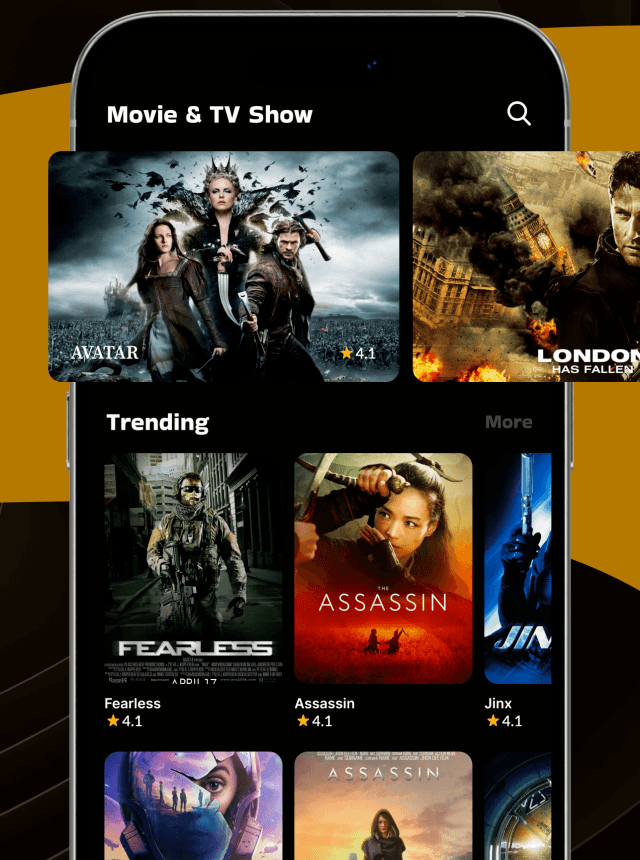
The application works through an internet connection when browsing or streaming videos. It displays movie posters, descriptions, and other useful information about available titles. You can explore action movies, comedy films, romantic stories, and different types of dramas. Some content also provides subtitles and multiple viewing quality options. Users looking for a Movie Box new version generally want updated functionality and better compatibility. The application attracts people who prefer browsing different entertainment categories from one place. Its offline viewing function can also reduce the need for repeated streaming. Searches for a Moviebox Premium APK may lead to unofficial or modified files. These files are not necessarily genuine versions of the application. Features, advertisements, and access restrictions can also change between releases.
How Does Moviebox Work?
The application uses an online content catalogue to display available movies and shows. When you open it, different entertainment categories appear on the home screen. You can browse these categories or search for a particular title.
Opening a movie normally displays information about that content. Available playback options depend on the selected video and application version. An internet connection is needed for online streaming and loading new content.
The application also advertises offline viewing for supported titles. However, downloading and streaming are different functions. Downloading requires available storage, while streaming uses an active internet connection.
Not every title is available in every region. Access can also change due to content restrictions and licensing arrangements.
Which Types of Content Are Available on Movie Box?
The application displays several entertainment categories for different types of viewers. You can explore movies, television series, dramas, and animated content through its catalogue. The collection may change depending on regional availability and platform updates.
Bollywood Movies
Hindi movies are one of the available entertainment categories. Users can explore action, romance, comedy, thriller, and drama films. The catalogue may include older films alongside more recent releases.
Hollywood Movies
The platform also lists English-language movies from different genres. These include adventure films, science fiction, horror, and family entertainment. Language and subtitle options depend on the selected movie.
South Indian Movies
Users may find Tamil, Telugu, Malayalam, and Kannada films in the collection. Some titles may also have Hindi-dubbed versions. Available languages can be different for each movie.
Web Series
The application lists different television and web series. These include crime stories, romantic dramas, mysteries, and comedy shows. Episodes are generally arranged by their respective seasons.
Korean Dramas
Korean dramas are another entertainment category available through the platform. Users can explore romantic stories, action dramas, and other Korean shows. Selected titles may include subtitles in different languages.
Anime and Animated Shows
The anime collection contains animated films and television series. Different genres may include fantasy, action, adventure, and comedy. Available audio languages and subtitles vary between titles.
Short Dramas
Short dramas provide another way to explore entertainment content. These usually contain shorter episodes compared to traditional television series. They can be useful for viewers who prefer shorter viewing sessions.
What is the Difference Between Movie Box Free and Premium?
The Movie Box free app APK is generally associated with basic entertainment features and advertising-supported access. Users may browse available content without purchasing a subscription. However, some videos and viewing options may have restrictions.
The platform also displays limited free access labels on certain titles. This means access conditions may not remain the same for every movie or show.
People searching for the Movie Box premium version often want additional video quality options, fewer advertisements, or better download functionality. These benefits should be checked against the actual subscription details.
A third-party Movie Box Premium APK download is not necessarily an official premium release. Modified files may contain unwanted changes or security risks. Premium access also does not automatically establish that all available content is licensed.
How to Download, Install, and Use Moviebox?
The Movie Box APK download format is designed for compatible Android devices. If you are considering installing an Android APK, follow these basic installation and security checks.
- Check whether your Android device meets the application’s requirements.
- Verify the identity of the application and its developer.
- Make sure the file comes from a legitimate distribution source.
- Check the available version and required storage space.
- Download the verified APK file to your Android device.
- Scan the downloaded file and keep Google Play Protect enabled.
- Open the downloaded APK through your device’s file manager.
- Review the installation permission and proceed only if the source is trusted.
- Stop the installation if your device detects a security threat.
- Open the application after successful installation and review its permissions.
- Explore available categories and access only content you are authorized to watch.
- Disable the unknown app installation permission after completing the installation.
Features of Moviebox
Large Entertainment Collection
The application contains different categories of movies and television shows. Users can explore regional and international entertainment content. The collection includes different genres for different viewing preferences. Available titles may change according to your region.
High-Quality Video Streaming
The application offers different video quality options for supported content. You can select a resolution according to your internet speed. Higher video quality generally requires more internet data. Available resolutions also depend on the selected video.
Offline Video Downloads
The Movie Box download feature allows users to save supported videos. Downloaded content can be watched without an active internet connection. This function is useful while travelling or facing network problems. Available storage and download restrictions may affect this feature.
Simple User Interface
The application has a clean and easy-to-understand layout. Different entertainment categories are available through the home screen. Users can browse movies without navigating through complicated menus. This design makes the application easier for new users.
Multiple Language Support
The platform contains entertainment content in different languages. Users may find Hindi, English, Tamil, Telugu, and other regional content. Some movies also provide dubbed audio options. Language availability depends on the selected title.
Subtitle Support
Subtitles are available for selected movies and television shows. This feature helps users understand content in unfamiliar languages. You can check available subtitle options through the video player. Not every movie provides subtitles in multiple languages.
Fast Content Search
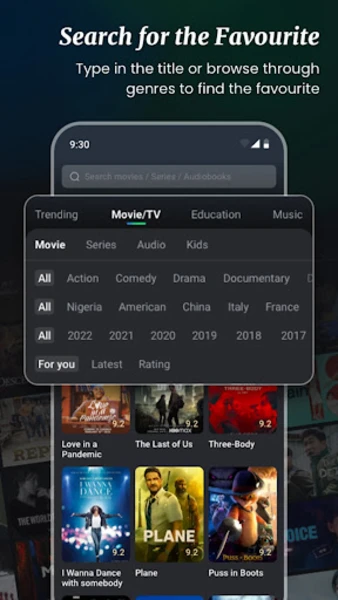
The search function helps users find specific entertainment content. You can enter the name of a movie or series. Related results appear according to the available catalogue. This reduces the time spent browsing different categories.
Different Entertainment Genres
The application organizes content into different entertainment genres. These include action, comedy, romance, horror, thriller, and adventure. Users can browse categories according to their interests. Genre-based browsing also helps with discovering unfamiliar movies.
Trending Movies and Shows
The home screen displays popular and trending entertainment content. Users can explore titles without searching for individual movie names. This section helps viewers discover currently popular movies and shows. Trending selections may change over time.
Movie Recommendations
The application displays suggested and related entertainment titles. These suggestions help users discover similar movies and television shows. You can explore more content after checking a particular movie. Recommendations depend on the available entertainment catalogue.
Movie Information and Descriptions
Users can check information about movies before watching them. Available details may include descriptions, release information, and genres. This helps viewers understand the basic story of a movie. Information availability can differ between individual titles.
Organized Series and Episodes
Television series are generally organized into seasons and episodes. Users can browse available episodes from a series page. This makes longer television shows easier to follow. Episode availability depends on the current content collection.
Adjustable Video Quality
Users can adjust playback quality when different resolutions are available. Lower quality can help reduce internet data usage. Higher quality provides clearer visuals on supported devices. This flexibility is useful when switching between mobile data and Wi-Fi.
Free Entertainment Access
The Movie Box free app APK offers access to selected entertainment content. Users may browse and watch available free titles. Advertisements or other access restrictions may apply. Not every feature or movie is necessarily free.
Premium Access Options
Users searching for Movie Box Premium often want additional viewing benefits. Premium access may include different playback or download options. Actual benefits depend on the available subscription and application version. Unofficial modified APK files should not be confused with genuine premium access.
Regular Content Changes
The entertainment catalogue can change as new content becomes available. Users may discover additional movies, dramas, and television series. Existing titles may also become unavailable over time. Content updates are separate from application version updates.
Which Devices Support Moviebox?
The application is advertised for different types of devices. However, supported features and installation methods may vary between platforms.
Android Smartphones and Tablets
Android smartphones are commonly used to access the application. Users looking for a Movie Box app install should check their Android version first. Tablets may also support compatible Android releases. Available storage and device performance can affect playback and installation.
Android TV
The platform advertises a separate option for Android TV devices. This allows compatible television users to browse entertainment on larger screens. However, not every smart TV uses the Android operating system. Users should check their television model and software before installing anything.
Windows PC and Laptop
A Windows option is also advertised by the platform. Users can check whether a compatible desktop release is available. An Android APK does not install directly on Windows. Desktop functionality may differ from the mobile application.
iPhone and iPad
Android APK files cannot be installed directly on Apple devices. Users should check whether a legitimate iOS or browser-based option exists. Availability may differ depending on the country and current platform support. Avoid installing unknown configuration profiles or unverified iOS applications.
How to Update Moviebox to the Latest Version?
Application updates may contain bug fixes and compatibility improvements. Users searching for a Moviebox latest version APK update should check the developer’s release information.
Before installing an update, compare the installed version with the available release. Check whether the newer file comes from the same verified source.
- Check the currently installed application version.
- Review available release information.
- Confirm the identity of the file provider.
- Make sure your device has enough storage.
- Scan the updated installation file.
- Keep your device’s security protection enabled.
- Install the update only if the source is trustworthy.
- Open the application and check its functionality.
Avoid removing the existing application unnecessarily. Uninstalling it may remove saved settings and downloaded content.
Why is Moviebox Not Working?
The application may sometimes experience loading, installation, or playback problems. These problems can occur because of internet issues or device compatibility. Some videos may also become unavailable due to regional restrictions.
Video Buffering Problems
A slow internet connection can cause videos to load repeatedly. Try checking your network connection or reducing the playback quality. Closing other internet-heavy applications may also improve streaming performance.
Application Not Opening
An outdated application version may cause opening or crashing problems. Restart your device and check whether an update is available. Clearing temporary application files may also help in some cases.
APK Not Installing
Installation problems may occur because of insufficient storage or incompatible Android versions. A damaged or untrusted installation file can also cause errors. Check the file source and device requirements before trying again.
Movies Not Playing
Some movies may become unavailable because of content restrictions. Temporary service problems can also affect video playback. Check whether other available and authorized titles are working properly.
Download Not Working
Offline downloads require sufficient storage and a stable internet connection. Some titles may not support the downloading function. Download restrictions can also depend on the application version and access conditions.
Pros and Cons
Pros
- Different movie and television show categories.
- Simple and mobile-friendly interface.
- Multiple video quality options.
- Offline viewing for supported content.
- Regional and international entertainment collection.
- Subtitles for selected movies and shows.
- Easy movie and series searching.
- Different audio language options.
- Organized television seasons and episodes.
- Trending and related movie suggestions.
- Free access to selected entertainment content.
- Advertised support for multiple device types.
Cons
- Streaming requires a stable internet connection.
- Advertisements may interrupt free viewing.
- Some content has regional access restrictions.
- Third-party APK files may contain security risks.
- Features and compatibility vary between releases.
- Content licensing and distribution rights may be unclear.
Moviebox vs Netflix
Moviebox and Netflix are entertainment platforms that provide access to movies and television shows. Both offer different content categories, subtitles, and playback options. However, their subscription models and application distribution methods are different. Users searching for Movie Box Premium or a Movie Box APK download often compare these services before installing an application. Netflix operates through a licensed subscription-based streaming service, while Movie Box advertises free and premium entertainment access.
| Feature | Moviebox | Netflix |
| Free Streaming | Selected content | No |
| Premium Access | Available options | Paid subscription |
| Offline Viewing | Supported titles | Supported titles |
| Subtitles | Selected titles | Available |
| Video Quality | Content dependent | Plan dependent |
| Android APK | Advertised | Official store app |
| Smart TV Support | Selected devices | Supported devices |
| Content Licensing | Not fully verified | Licensed content |
| Application Updates | Provider dependent | Official updates |
| Original Productions | Not verified | Available |
Movie Box provides selected free entertainment content without requiring a regular paid subscription. Users can explore different movie categories, regional films, and television shows. The application also advertises options for offline viewing and different playback qualities. People searching for a Moviebox Premium APK may find several versions online. However, these versions may have different functions and access restrictions. The identity of the file provider and the availability of licensed content should also be considered when comparing the platforms.
Netflix provides movies, documentaries, television series, and original productions through paid membership plans. Its applications are available through official distribution channels for supported devices. Users can receive application updates and access customer support. Netflix also provides personalized recommendations, viewing profiles, parental controls, and subtitle options. Offline viewing is available for selected content on compatible devices. Video quality and simultaneous viewing depend on the subscription plan. The entertainment collection also varies between countries due to regional licensing agreements.
Moviebox Alternatives
Some users look for similar entertainment applications when their favorite content is unavailable. Others search for a Movie Box new version or Movie Box Premium download because of playback limitations. Several licensed streaming platforms provide similar entertainment functions. These applications offer different content collections, subscription options, and device compatibility. Their availability may also depend on your country.
Amazon Prime Video
Amazon Prime Video is a streaming application for movies, television shows, and original series. It contains international films alongside content from different regional entertainment industries. Users can explore different genres and select available subtitle or audio options. The application also supports offline downloads on compatible devices. Some content requires a separate rental, purchase, or additional subscription. Compared with Movie Box, Prime Video operates through an established subscription and licensed content distribution system. Its entertainment collection may differ depending on the user’s country.
JioHotstar
JioHotstar is an entertainment and sports streaming platform available in India. It provides movies, television shows, web series, and live sporting events. Users can explore Hindi content and entertainment in several regional languages. The platform also offers international shows and films. Access to certain content depends on the available subscription plan. Unlike Movie Box, JioHotstar includes licensed sporting events as part of its entertainment service. Its playback quality, device support, and other viewing benefits may vary according to the selected membership.
ZEE5
ZEE5 is an entertainment platform that focuses on Indian and regional content. It offers Bollywood movies, television serials, web series, and original productions. Users can explore content in Hindi, Tamil, Telugu, Bengali, and other languages. Some entertainment content may be available without a paid membership. Premium titles require an eligible subscription. Like Movie Box, it provides different entertainment categories for mobile viewers. However, ZEE5 distributes content through its licensed streaming service and official applications. Its catalogue and subscription options vary between regions.
Amazon MX Player
Amazon MX Player is an advertising-supported entertainment platform in India. It provides movies, web series, international shows, and dubbed entertainment content. Users can explore different genres, including comedy, romance, action, and crime. The service includes selected content that users can watch without paying subscription charges. Advertisements may appear during video playback. People exploring a Movie Box download may also find similar entertainment categories on this platform. However, content availability and viewing functions depend on the user’s location and supported device.
FAQs about Moviebox
Is Moviebox Safe to Use?
The safety of the application depends on its source and actual file contents. Third-party APK files may contain harmful or unwanted changes. Keep device security protection enabled and review application permissions before installation.
Is Moviebox Available on the Google Play Store?
Applications with similar names may appear on Google Play. However, they are not necessarily the same streaming application. Always check the developer’s identity and application description before installing any version.
Does Movie Box Require Root Access?
Root access is not normally needed to install standard Android applications. Avoid any version that unnecessarily requests root access or requires you to disable important device security protections.
Can I Watch Movies Without Creating an Account?
Some available content may be accessible without signing into an account. However, account requirements can change between versions. Certain functions or premium options may require registration.
Does Moviebox Consume a Lot of Internet Data?
Internet data usage depends on video quality and viewing duration. Higher resolutions generally consume more data. Selecting a lower playback quality can help reduce mobile data consumption.
How Much Storage Does Movie Box Require?
Storage requirements depend on the application version and downloaded content. Movies saved for offline viewing require additional space. Check the actual installation file size before downloading it.
Is Moviebox Legal to Use?
Legality depends on the content distribution rights and applicable local laws. The availability of a movie does not necessarily mean it is licensed. Users should only access content they are authorized to watch.
Can I Transfer Downloaded Movies to Another Device?
Offline downloads may be stored inside the application. They may not appear as ordinary video files. Transferring downloaded content depends on the application’s storage system and content restrictions.
Conclusion
Moviebox is an entertainment application that brings different movie and television categories into one place. Users can explore Bollywood films, Hollywood movies, Korean dramas, anime, and regional content. The application advertises different playback qualities, subtitle options, and offline viewing functions. Its simple interface helps users browse available content without complicated navigation. Many Android users search for a Movie Box APK download because they want access to these entertainment functions on mobile devices. Different language options are also useful for viewers with different preferences. However, available titles and viewing features may change between application releases. Internet speed, device performance, and storage space can affect the overall experience. Users should check the actual compatibility requirements before installing the application. It is also important to understand whether the available entertainment content has proper distribution rights.
People also search for Movie Box Premium because they want additional viewing options and fewer interruptions. However, premium benefits depend on the actual service and available subscription. A modified Moviebox Premium APK should not be treated as a verified premium release. Application updates may improve compatibility or resolve existing problems, but their changes should be checked before installation. Users may also experience buffering, unavailable videos, or installation errors on certain devices. The application advertises support for mobile devices, Android TV, and Windows, although compatibility can differ. Similar licensed entertainment platforms are also available for watching movies and television shows. Each platform has its own content collection, viewing restrictions, and subscription requirements. The overall experience depends on the available application version, internet connection, and individual viewing preferences. Checking the file source remains an important part of installing any third-party Android application.